

Automated Time Tracking for Lawyers
Manual timers ask lawyers to do the one thing busy days do not allow: remember. Automated time tracking removes much of that remembering. MIRA reconstructs the working day from email, meetings, documents, approved browser activity, and supported desktop work across Microsoft 365 and Google Workspace, then prepares draft time entries. At day's end, lawyers review time instead of rebuilding it from a sent folder.
Capture legal work activity without relying only on timers
Review captured time inside Microsoft Teams
Prepare clearer entries before billing
Keep lawyers in control of final time records
The Problem
Manual tracking does not match how lawyers work
Legal work does not happen in clean blocks. Lawyers move between calls, documents, meetings, emails, research, and client questions throughout the day.
Manual timers and end-of-day timesheets depend on perfect behavior. That is not realistic for most legal teams.
Manual timers are easy to forget
Lawyers often start work before starting a timer or forget to switch matters.
End-of-day entry loses detail
Descriptions become less accurate when lawyers reconstruct time later.
Short tasks disappear
Quick matter-related work often goes unrecorded even when it is valuable.
Calendar and document work is scattered
Scheduled meetings and document activity sit in separate systems.
Billing review starts with incomplete data
Missing or vague time entries create finance and partner review friction.
The Solution
Capture activity automatically and review it with judgment
MIRA helps automate legal time capture by surfacing work activity from connected systems. Lawyers can then review captured activity and decide what should become time.

Capture more work activity
Reduce dependence on memory
Avoid blind auto-submission
Keep lawyer review in the process
Time Capture
Turn everyday activity into reviewable time entries
MIRA helps capture signals from legal work systems, including document work, calendar events, file activity, browser activity, and related workflows.
This gives lawyers a better starting point than an empty timesheet.
Automated activity capture
MIRA helps identify work signals from connected legal and Microsoft systems.
Review before release
Lawyers decide what gets edited, merged, saved, excluded, or released.
Better billing inputs
AI-assisted descriptions help improve entry quality before billing review.
Microsoft Teams Native
Review automated time capture in Microsoft Teams
MIRA lets lawyers review time inside Microsoft Teams.
View captured activity
Edit descriptions
Merge related tasks
Save entries
Release approved time
The workflow is designed to reduce friction. Lawyers do not need to learn another heavy platform just to manage captured time.
MIRA supports automation while preserving control.
Billing Accuracy
Improve descriptions while context is still fresh
Automated capture is most valuable when it leads to clear, accurate entries.
A captured event or document signal still needs a useful billing description.
MIRA supports AI-assisted descriptions and task or activity code suggestions. Lawyers can refine entries before release.
This helps reduce vague entries and billing review cleanup.
Integrations
Connect automated tracking to the firm’s real workflow
MIRA supports workflows involving Microsoft Teams, Outlook Calendar, OneDrive, iManage Work, Chrome, and connected finance systems such as Aderant, Elite, MATTEROOM, QBO, and custom integrations.
These connections make automated tracking more useful because they reflect where legal work actually happens.
Fit Assessment
Who should use automated legal time tracking?
MIRA is a fit for firms where manual timers are not working, lawyers enter time late, short tasks are missed, and finance teams need clearer entries before billing review.
It is especially useful for firms already using Microsoft Teams, Microsoft 365, iManage, or supported finance systems.
Differentiation
Automation without removing lawyer control
Some automated tracking tools lean toward employee monitoring or raw productivity measurement. Legal timekeeping needs review, confidentiality awareness, matter context, and billing judgment.
MIRA is designed to assist timekeeping, not to bypass lawyer review.

Free comparison chart: Manual vs Automated Time Tracking Comparison
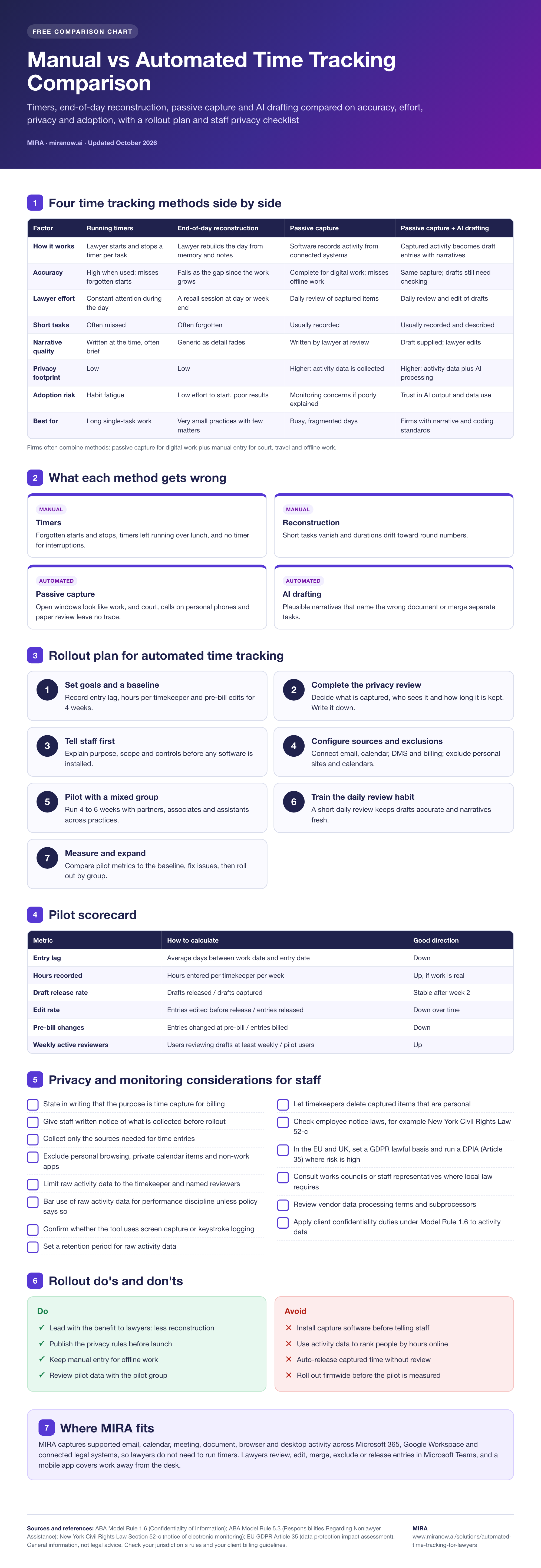
Open the full-size infographic · Download the PDF version
How It Works
From automated capture to reviewed entries
MIRA captures activity signals from connected systems.
Captured activity appears for lawyer review.
The lawyer edits, merges, saves, excludes, or releases entries.
AI assistance helps prepare descriptions and codes.
Approved entries move toward the finance workflow.
Business Impact
Reduce missed work and manual reconstruction
Automated time tracking helps firms capture more work already completed, reduce timekeeping admin, and give finance teams cleaner entries before billing review.
It also helps lawyers spend less time recreating the day from memory.
Related resources: Read about passive time capture, missed billable hours, and AI time tracking.
FAQ
Frequently Asked Questions
What activity does MIRA capture automatically?
MIRA captures supported email, calendar, meeting, document, browser, and desktop activity across Microsoft 365, Google Workspace, and connected legal systems. See how passive time capture works.
Do I still need to run timers?
No. Passive capture reduces dependence on starting and stopping timers, while lawyers retain control through the review workflow.
What about work away from my desk?
MIRA includes a mobile application and supports adding or reviewing work that happens away from the desktop.
