

Billable Time Tracking for Law Firms
For a firm, billable time tracking is not only a personal habit; it is a revenue system. Every untracked six-minute increment across every timekeeper compounds into lost revenue by year end. MIRA gives firms a more consistent workflow with automatic activity capture, timekeeper review, and analytics and reporting that make missing work easier to identify before billing.
Capture activity across the tools lawyers already use
Review time inside Microsoft Teams
Prepare clearer matter-based descriptions
Release approved entries toward finance systems
The Problem
Why billable time is still being missed
Lawyers perform many short tasks throughout the day. A brief client call, a document review, an email follow-up, or a research task may be billable, but it is easy to forget when time is entered later.
Manual reconstruction makes time records less complete and descriptions less precise. The result is revenue leakage, slower billing review, and more administrative work.

Short tasks are easy to miss
Quick calls, emails, research, and document reviews often disappear from end-of-day timesheets.
Late entry reduces accuracy
Reconstructing a busy day from memory leads to incomplete time and vague descriptions.
Manual timers interrupt legal work
Starting and stopping timers adds friction and still depends on consistent lawyer behavior.
Billing review takes too long
Finance teams spend time chasing missing entries and clarifying incomplete narratives.
Disconnected tools hide activity
Work spread across documents, calendars, email, and browsers is difficult to capture consistently.
The Solution
Capture work as it happens without relying on timers
MIRA records activity signals from connected legal work systems and helps turn them into draft time entries. Lawyers can review the captured activity and decide what should be saved, merged, edited, or released.
Free map: Billable Time Leak Map
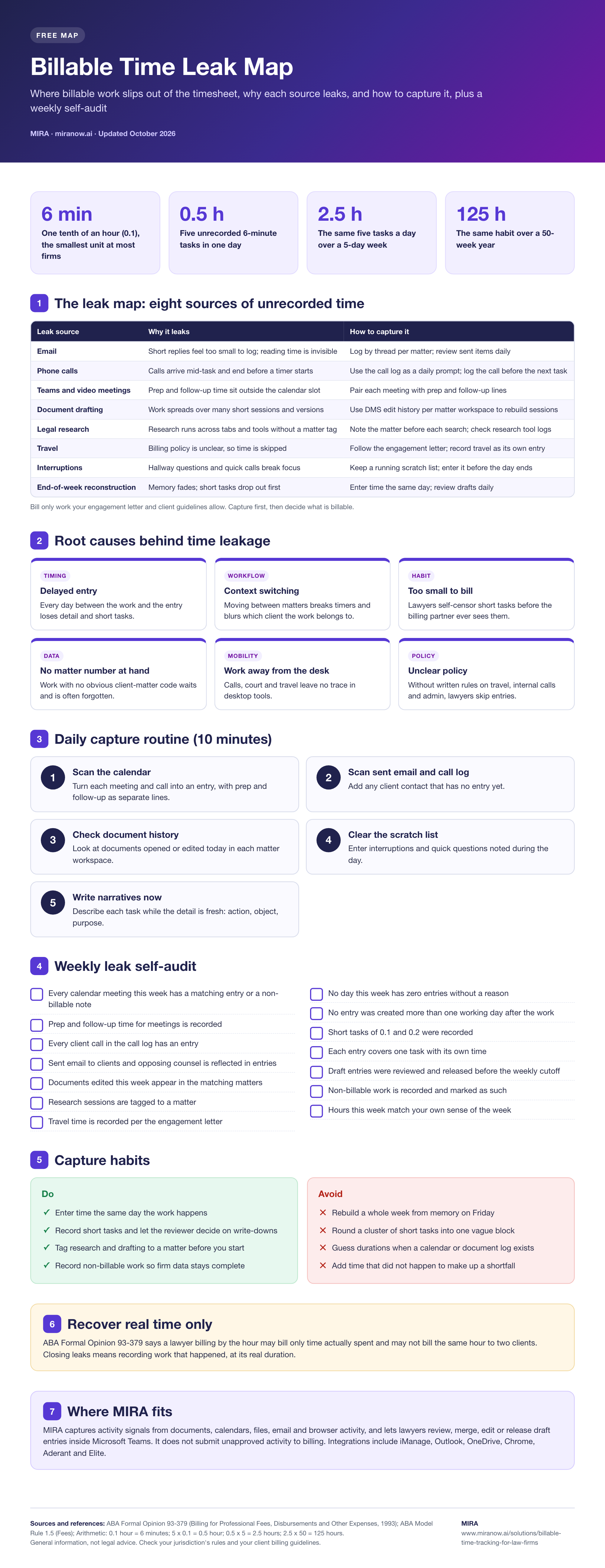
Open the full-size infographic · Download the PDF version
Less dependence on memory
More complete time capture
Clearer entries for billing review
Lawyer control before release
Time Capture
Turn everyday legal work into reviewable time entries
MIRA helps surface work from documents, calendars, files, email, and browser activity. That gives lawyers a more complete starting point than an empty timesheet at the end of the day.
Captured activity can be associated with the correct client and matter, reviewed for billing relevance, and prepared with a clearer narrative.

Capture more billable activity
MIRA identifies work signals that may otherwise be missed.
Prepare clearer entries
AI-assisted descriptions help lawyers explain completed work more precisely.
Review with less friction
Lawyers stay in control while reviewing, merging, editing, or releasing entries.
Microsoft Teams Native
Review captured time in a familiar workspace
MIRA is designed to work inside Microsoft Teams, reducing the need for lawyers to learn another standalone platform.
Review captured activity
Edit or merge entries
Save work for later
Release approved time
The lawyer remains in control of every entry. MIRA supports the review process without automatically submitting unapproved activity to billing.
This familiar workflow helps reduce adoption friction across busy legal teams.
Billing Accuracy
Improve entry quality before invoices are prepared
Complete time capture is only part of the process. Entries also need useful descriptions, correct matter information, and any required billing codes.
MIRA helps lawyers prepare structured entries closer to the moment the work occurred.
AI-assisted descriptions and task-code suggestions can reduce vague narratives and make entries easier for finance teams to review.
Clearer inputs support faster invoice preparation and more transparent client billing.
Integrations
Connect timekeeping with the systems your firm already uses
MIRA integrates with common legal and Microsoft work systems, including iManage, Outlook, OneDrive, Chrome, Aderant, and Elite.
These connections help firms capture activity across the real workflow instead of requiring lawyers to duplicate it in another tool.
Fit Assessment
Who should use automated billable time tracking?
MIRA is a strong fit for firms where lawyers enter time late, short tasks are frequently missed, billing narratives need improvement, or finance teams spend too much time chasing incomplete records.
It is especially useful for firms already working in Microsoft Teams, Microsoft 365, iManage, or supported finance systems.
Differentiation
What makes MIRA different from generic time tracking?
Generic tracking tools often focus on attendance, timers, or employee monitoring. Legal timekeeping requires matter-based review, billing descriptions, lawyer control, privacy awareness, and finance-system integration.
MIRA is designed around those legal workflows and keeps the review experience close to tools lawyers already know.
How It Works
From captured activity to approved time
MIRA captures activity signals from connected work systems.
The lawyer reviews captured work inside Microsoft Teams.
Entries can be saved, merged, edited, or excluded.
AI assistance helps prepare descriptions and billing codes.
Approved entries move toward the firm's finance workflow.
Business Impact
Support revenue, productivity, and client trust
Better billable time tracking helps firms capture more work already performed, reduce the burden of timesheet reconstruction, and prepare invoices with fewer gaps.
It also gives clients clearer billing detail and gives firm leaders better visibility into work in progress.
Related resources: Learn how to track billable hours, identify missed billable hours, and use the billable hours chart.
FAQ
Frequently Asked Questions
How much billable time do firms lose?
The amount varies by practice, rates, and time-entry habits. Use the AI time calculator to estimate your firm's potential missed time and recovery opportunity.
Can firm leaders review timekeeping trends?
MIRA includes analytics and reporting and helps surface captured work for review. Ask the MIRA team to confirm the firm-level views and permissions available for your plan.
Will lawyers actually use it?
MIRA reduces reliance on timer discipline. Lawyers review draft activity instead of reconstructing the entire day from memory.
